

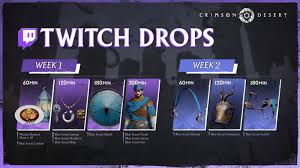
Crimson Desert’s launch Twitch Drops campaign continues with Week 2, offering exclusive Blue Scout horse tack cosmetics to match your character’s Blue Scout outfit from Week 1. These mount items are perfect for customizing your horse and giving it a coordinated, stylish look while riding across Pywel.
This guide covers the exact Week 2 release time, all rewards, watch time requirements, and the complete step-by-step process to claim your drops on PC (Steam/Epic), PS5, and Xbox.
Week 2 Twitch Drops Release Time & Schedule
- Start: March 26, 2026, at 00:00 UTC
(March 25, 2026 – 5:00 PM PT / 8:00 PM ET / March 26, 1:00 AM CET) - End: April 1, 2026, at 23:59 UTC
(April 1, 2026 – 4:59 PM PT / 7:59 PM ET / April 2, 00:59 CET)
Note: Week 1 rewards remain claimable during Week 2 until the overall campaign ends on April 1. Total watch time needed for everything across both weeks is about 8 hours.
Week 2 Rewards – Blue Scout Horse Tack
Rewards unlock based on cumulative watch time on any Crimson Desert Twitch streams with Drops enabled. You don’t need to watch one long stream—progress adds up.
| Watch Time | Reward | Description |
|---|---|---|
| 60 minutes (1 hour) | Blue Scout Stirrups | Matching foot gear for your mount |
| 120 minutes (2 hours) | Blue Scout Champion | Protective head armor for your horse (often called horse mask) |
| 180 minutes (3 hours) | Blue Scout Saddle | Full saddle set to complete the look |
These cosmetics cannot be dyed and are purely visual. Together with Week 1’s Blue Scout outfit (cloak, armor, hat, accessories, shield, lantern + food), they create a fully coordinated Blue Scout theme for Kliff and his horse.
How to Claim Crimson Desert Twitch Drops (Step-by-Step)
Twitch Drops do not appear automatically in-game. You must manually claim them through Twitch and the official Pearl Abyss site.
- Link Your Accounts (Do this first if you haven’t):
- Go to the official Crimson Desert Twitch Drops page: https://event.pearlabyss.com/CrimsonDesert/Drops
- Log in with your Pearl Abyss account (the same one linked to your game platform).
- Click Log in to Twitch and authorize the connection.
- Watch Qualifying Streams:
- Head to the Crimson Desert category on Twitch: https://www.twitch.tv/directory/category/crimson-desert
- Only streams with Drops enabled (usually marked) will count.
- Keep the stream running in the background—you can mute it or watch multiple (but progress is per account, not multiplied).
- Claim on Twitch:
- Go to your Twitch Drops inventory: https://www.twitch.tv/drops/inventory
- When a reward is ready, click Claim for each one.
- Claim on Pearl Abyss Site:
- Return to the official Drops event page.
- Scroll to Check My Rewards and log in with Twitch if prompted.
- Claim each reward individually and select your platform (Steam, Epic, PlayStation, Xbox, etc.).
- Redeem In-Game:
- Launch Crimson Desert.
- Go to Menu > Others > Options > Add-ons.
- Your claimed rewards (including preorder/deluxe items) will appear here — redeem them to your inventory or horse equipment slots.
Pro Tips:
- Restart the game after claiming if items don’t show immediately.
- Watch time is tracked across the entire week — no need for consecutive hours.
- Rewards cannot be traded or sold.
- If playing on console, make sure your Pearl Abyss account is properly linked to your platform account.
Common Issues & Fixes
- Drops not progressing: Ensure the stream has Drops enabled and you’re logged into the correct Twitch account.
- Nothing in the Add-ons menu: Double-check your claim on both Twitch and the Pearl Abyss site.
- Platform mismatch: Select the correct platform when claiming on the event page.
- Still stuck? Log out/in on both sites or restart your game/client.
Week 2 is much lighter than Week 1 (only 3 hours needed for the full horse set), making it easy to complete even if you missed some time earlier.
Have you already grabbed the Blue Scout stirrups or full horse set? Drop your favorite mount cosmetic combo in the comments!
For more Crimson Desert guides:
- Where to Find Beds in Crimson Desert for Sleeping and Resting
- Delesyian Longsword Location, Stats and Life Transference Abyss Gear Guide
- Sanctum of Expiation Puzzle Solution
- Helm of Knowledge Location Guide
Happy watching and riding in style through Pywel!
Last updated: March 25, 2026 — Based on official Pearl Abyss launch campaign details.