

In Version 3.2 (“Resolution to Illuminate the Shadows”), Wuthering Waves rolled out major Echo Management upgrades, turning what used to be a tedious inventory nightmare into a streamlined, shareable system. The new Echo Management Plan feature lets you create custom rules for auto-locking promising Echoes (great substats, main stats) and auto-marking trash for discard. Best of all, you can generate a Plan Code to share your setup or import codes from others—perfect for borrowing meta builds for characters like Sigrika, Qiuyuan, or Aero/Echo teams.
This guide covers everything: what the feature does, how to use it, how to import/share codes, recommended setups for popular Sonata Effects (especially Aero-focused ones in 3.2), community-shared codes, and tips to optimize your Echo farming and inventory in the current meta (as of March 2026). Say goodbye to manual sorting forever!
What is Echo Management Plan in Version 3.2?
The Echo Management system received a huge overhaul in 3.2:
- Plans are now edited per Sonata Effect (e.g., separate rules for Sound of True Name, Sierra Gale, Moonlit Clouds, etc.).
- When you obtain a new Echo, the game automatically locks it if it matches your plan’s criteria (main stats on Cost 4/3/1, substats) or marks it for discard if it doesn’t.
- Suggested Plans — Import pre-made recommended configurations with one click.
- Manage Owned Echoes — Batch lock or discard based on your active plan.
- Sharing & Importing — Generate a code for your entire setup (priorities, main stats, substat rules) and share/import via codes. This works across servers but may have regional variations.
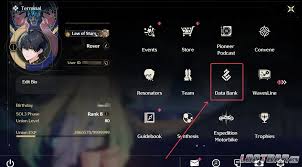
Requirements: Unlock at Data Bank Level 21+. Access via Data Bank > Echo Management tab or Backpack > Echoes > Echo Management.
This QoL change is massive for endgame players grinding Tacet Fields, boss Echoes, or open-world farms—especially with new Aero Echo sets like Sound of True Name for Sigrika.
How to Use Echo Management Plans
- Open Data Bank (menu) or Backpack > Echoes.
- Go to Echo Management (bottom circle icon or top button).
- Select a Sonata Effect (e.g., Sound of True Name for Sigrika/Qiuyuan teams).
- Edit the plan:
- Set Main Stats for Cost 4 (Crit Rate/DMG), Cost 3 (Elemental DMG Bonus), Cost 1 (ATK%).
- Define Substat Priorities (e.g., lock if Crit Rate + Crit DMG > certain threshold, or specific combos like double crit + ATK%).
- Choose Auto-Lock rules (e.g., always lock Cost 4 with perfect main stat).
- Set Discard filters (e.g., auto-mark if no crit substats).
- Enable the plan (make it active).
- New Echoes auto-sort; use Manage Owned Echoes to batch process your inventory.
- To share: Click Share & Import > Generate code.
- To import: Share & Import > Enter code > Read Plan Code.
Pro tip: Use Suggested Plans for quick meta setups if you’re new to customizing.
How to Import and Share Echo Management Codes
- Reach Data Bank Lv. 21.
- In Echo Management > Share & Import (top-right).
- Paste code in Import Plans > Read.
- The plan imports per Sonata Effect—activate as needed.
Codes are server-specific in some cases (e.g., America vs. Asia), but many work globally. Community shares often come from Reddit, YouTube theorycrafters, or Discord.
Recommended Echo Management Plan Codes (Version 3.2)
Here are some early community-shared codes for 3.2 meta (mostly standard/on-set builds). These focus on popular sets like Sound of True Name (Sigrika), Sierra Gale (Aero DPS), Moonlit Clouds (supports), and general crit-focused rules.
America Server Examples (from community shares):
- General/Mostly On-Set Builds: 4T7aggze1kW9QGAKrBy5
(Shared by aliencreature9 on Reddit – good for perfect sets, auto-locks strong main stats + crit subs; great starter for Sigrika/Qiuyuan farming.)
Other Community Codes (check sources for updates):
- Early 3.2 Standard Builds (Reddit): Look for posts like “3.2 Echo (mostly) only standard builds share code!” – users post codes for on-set priority (e.g., locking only matching Sonata main stats).
- Sigrika-Specific (Sound of True Name focus): Many YouTubers (e.g., Saint, theorycraft channels) share codes in 3.2 Echo QoL videos—search for “Sigrika Echo Management code 3.2”.
- General Crit/Echo DMG: Import Suggested Plans in-game for defaults, then tweak.
Always verify codes in-game (they expire or get outdated). Join r/WutheringWaves or WuWa Discords for fresh shares—players post codes for specific characters like Sigrika (Aero DMG + Echo Skill Crit).
Best Practices for Echo Management in 3.2
- For Sigrika (Sound of True Name): Lock Cost 4 Crit Rate/DMG, Cost 3 Aero DMG, Cost 1 ATK%. Substats: Prioritize Crit Rate/DMG (1:2 ratio), Echo Skill DMG%, ATK%. Auto-discard non-crit pieces.
- For Qiuyuan/Support Sets (Moonlit Clouds/Sierra Gale): Focus Energy Regen + ATK% main stats; lock for team buffs.
- Farming Synergy: Set plans before grinding Tacet Fields (e.g., Frostlands Transit Port for Sound of True Name). New drops auto-sort—saves hours!
- Batch Management: After farming, use Manage Owned Echoes to discard junk in bulk.
- Data Bank Tips: Max level for better drops; use Chord Cleansing events for double Echo rates.
- Common Mistakes: Don’t over-restrict early—start broad (e.g., lock any double crit), refine later.
This system makes Echo farming feel rewarding instead of punishing. With Sigrika and Qiuyuan dominating Aero meta, optimized plans help you gear up faster for Endstate Matrix and Tower clears.
Import a code today, tweak for your roster, and watch your inventory stay clean while you farm those perfect Aero pieces. Happy hunting, Rover!


